
FAQs: Voice123 voice over samples
FAQs: Voice123 voice over samples
What is a Playlist?
A playlist is a series of short audio clips that showcase your voice acting abilities. It consists of multiple spots within the same project category, such as ‘commercial.’ Think of it as a folder where you can group your best work, and you decide how to name each group/playlist!
How do I create a new Playlist?
To create a new Playlist:
- Go to your profile and locate the Playlist section (make sure you are logged in)
- Click on ADD, located at the bottom right side of the section
- Add a Playlist name (that best describes the category of the samples it will include)
- Click on SAVE
- You’ve created a playlist!
How do I upload new samples to my Playlist?
To upload new samples:
- Go to your profile and locate the Playlist section (make sure you are logged in)
- Locate the Playlist you want to add samples into
- Click on the vertical ellipsis menu
- Select Edit Playlist
- Click on Add Sample
- Go to Option 1 and click and browse the file or drag and drop it
- Include a sample name according to the guidelines below.
- Fill in all the required fields
- Click on SAVE to save the samples
As you edit your Playlist by adding samples, be sure to click SAVE in the Playlist details dialog to save your changes.
How do I add existing samples to a Playlist?
- Go to your profile and locate the Playlist section (make sure you are logged in)
- Locate the Playlist you want to add samples into
- Click on the vertical ellipsis menu
- Select Edit Playlist
- Click on Add Sample
- Go to Option 2 and click on the Existing Samples dropdown menu
- Select the sample you want to add to the Playlist
- Fill in all the required fields
- Click on SAVE to save the sample
As you edit your Playlist by adding samples, be sure to click SAVE in the Playlist details dialog to save your changes.
Best practices when uploading samples to your playlists
What should you put in your sample name?
Write a catchy name so that clients can see what the sample is about. Include your character/role, client or brand name, and project category/type.
- If you’re interpreting a special character or a specific role, you can follow the structure: character/role name – project name – client name
- e.g., Narrator – Environmental documentary – National Geographic
- If it’s a commercial sample, follow this structure: Brand/company name – project type
- e.g., Wellness Organic – Instructional video for suppliers’ training
Can I describe an accent?
You can add up to 2 accents or dialects, such as Northern, Southern, American, and British, and be sure to avoid non-geographical terms.
How many voice styles can I add?
You can add up to 2 voice styles, such as warm and conversational
What search keywords should I use?
You can add up to 5 descriptive keywords that haven’t been used in the above fields. For instance: Morgan Freeman, Nike, easy-going, and approachable.
Why is it so important to name the samples in my Playlists correctly?
Naming your samples correctly is key to improving your Voice123 search ranking. The same applies to major search engine rankings such as Google or Bing.
There is no need to add long lists of keywords to your profile description. Our search is mainly matched with the sample title and the sample description. It’s all about the samples in your Playlists! It allows your work to be visible, searchable, and the right match for a client’s search.
When naming your Playlist, we recommend you use a short name that best describes the applicable category, such as:
- ‘Commercial’
- ‘TV Narration’
- ‘E-learning’
- ‘6-second spots’ and so on.
What should I avoid?
- ⚠️ Be mindful of only including adjectives that are absolutely relevant to what the sample is about (for both the name and the additional details). Avoid overdoing this information, as it could have a negative effect on searchability performance!
- 🚫 Avoid using emojis or special characters in the name. This decreases your sample’s searchability.
- 🚫 Avoid repetition! Using the exact same information in several of your samples will affect the sample’s ranking in search results. Each sample is unique and should showcase a specific aspect of your work.
Want even more information on how to optimize and structure your samples for better search visibility? Check out this article on The Booth: How to optimize your Voice123 samples for success
Best practices for Voice123 sample descriptions
We’ve updated the sample description forms in Voice123 to help improve your chances of being contacted by clients for projects that suit your VO skills.
Here’s a glossary of definitions for the updated sample fields:
Sample name:
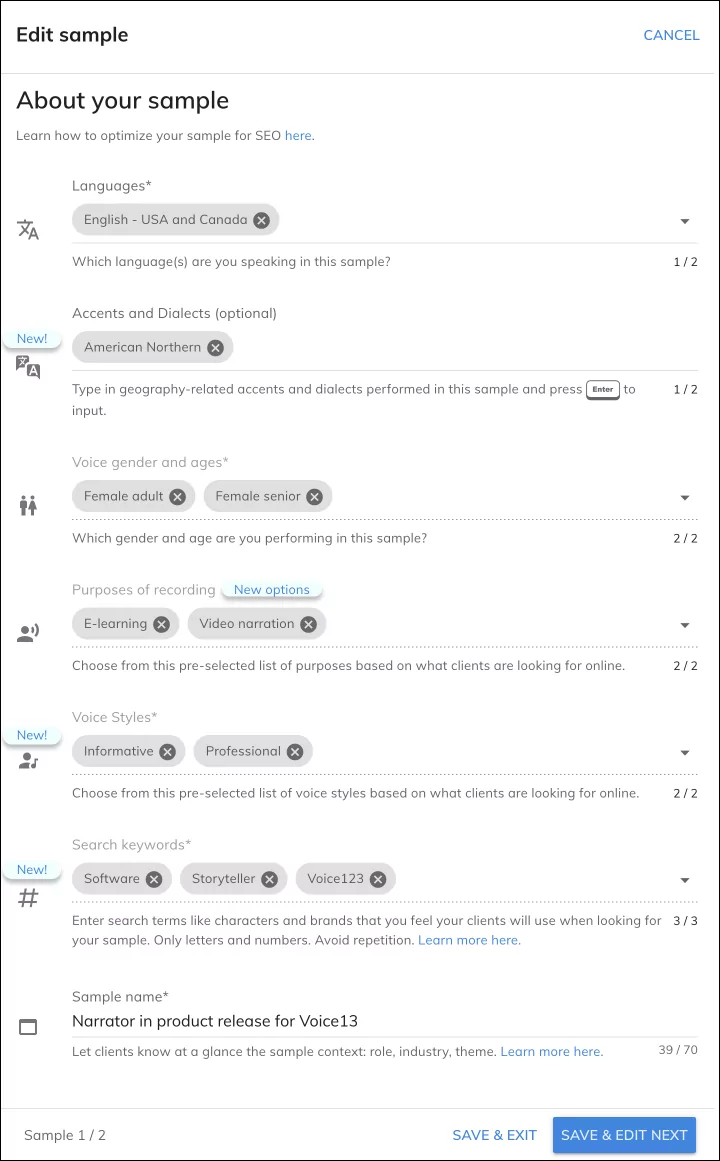
- Let people know what the sample is about! This is crucial for improving your relevance in the search results.
- Include your character/role, client or brand name, and project category/type, and tag your samples appropriately.
- You can decide the order in which you include each descriptive item. Remember that the first words are the ones that will stand out and will be immediately visible in the sample player.
Accents and Dialects:
- This section expands the ‘Languages’ field. You can add up to 2 accents or dialects, such as Northern, Southern, American, British, African-American, etc.
- There is no predefined list of options to choose from. Feel free to include any accent-related words that relate to your sample.
- Avoid non-geographical terms.

Voice styles:
- You can add up to 2 voice styles from a predefined list of options, such as warm, conversational, calm, happy, etc.
- Voice styles will be a filterable category for clients when using the search feature.

Here’s a list of the available voice styles you can choose from
- Aged
- Animated
- Authentic
- Authoritative
- Clear
- Confident
- Conversational
- Corporate
- Deep
- Dramatic
- Educational
- Energetic
- Explainer
- Friendly
- Funny
- Informative
- Natural
- Playful
- Professional
- Real
- Upbeat
- Voice Of God
- Warm
Search keywords:
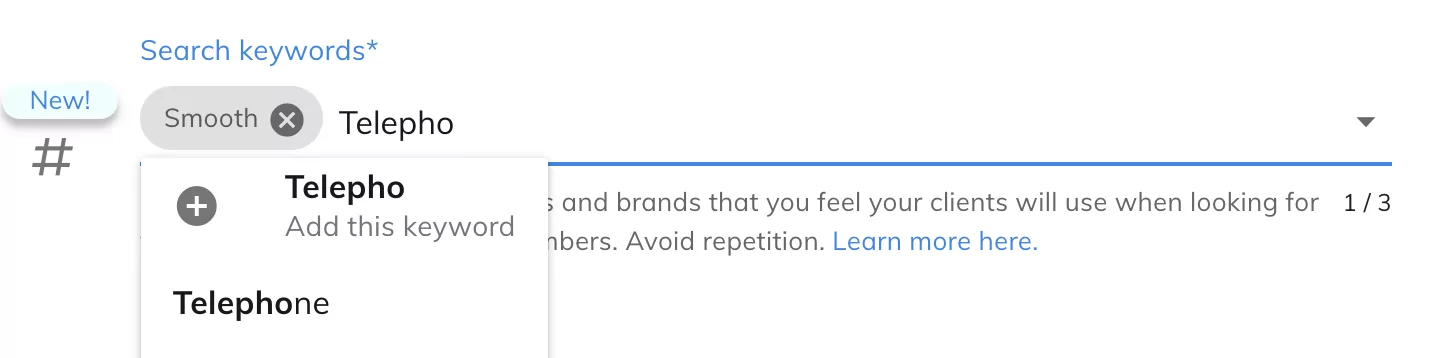
- You can add up to 3 descriptive keywords from a dropdown list or add tags such as characters, brands, or other keywords not considered in the previous fields.
- For example, Morgan Freeman, Nike, easy-going, approachable, etc. These should match commonly searched voice over terms.
- Search options are populated from client searches and can be used for inspiration, but be sure to choose only those that reflect your sample’s content.
- Avoid adding search keywords in this field that you may have previously added in the other fields. (sample name, language, accents, purposes, voice styles, etc.) This won’t provide additional benefits and will be a missed opportunity to include a new word that could match a client’s needs.
- Be sure to vary your search keywords among your samples. Avoid repetition so you can include more variety. Don’t lose the chance to include unique words in your sample to position it for clients. Each sample is unique and should showcase a specific aspect of your work.
Additional sample details:
If your samples have this section, you will still be able to see the content you had previously entered, which can be copied and saved for future use. However, this section will be phased out and will not affect the Voice123 search algorithm.
The goal of additional details is to distribute the words from this section amongst the existing fields (language, accents, purposes, voice styles) so that clients find your sample/s when they’re looking for that specific performance.
Updating your samples:
Here’s an example of an updated sample using the new sample structure:
If you need more information on proposals, bookings, project invitations, or any other topic, contact our Customer Success team at help@voice123.com.
We hope these tips will help you make the very best of your recordings!
Ready to upgrade your membership?
Share this post!
A blog owner yourself? Relevant links to quality sites will help your performance on search engines. If your readers will benefit from the services or information on The Booth's Voice over Guide, please consider linking to this post or the guide itself.

FAQs: Voice123 Auditions
FAQs: Voice123 Auditions
How do I use the 'Additional Audition Details' section?
With every audition, you can include a short note to the client. You can write this note in a section called “Additional Audition Details.” This section has a 1,000-character limit.
Here are some tips when providing these additional details:
- Provide your direct contact information.
- Provide information regarding things such as revisions or budgets.
- Always be professional and friendly.
- Briefly explain to the client why you believe you are the right voice actor for their project.
- Avoid repeating information that’s on your profile.
- Avoid sending the same phrase with every audition.
What does each project status mean?
We have three different statuses for projects; here’s some information on each one and what it means.
- Pending approval – the Voice123 Quality Control team has not yet approved the project.
- Active – the project is receiving auditions from voice actors invited either by Voice123 or directly by the client.
- Closed – the project has reached its deadline, the client has decided to stop accepting auditions, or Voice123 has decided to terminate it.
Is there a limit to the number of auditions I can submit per day?
No, there’s no limit to the number of auditions you can submit daily on Voice123!
However, keep in mind that Voice123 takes into account your ranking score as well as your membership level to determine if and when to invite you to projects.
To maintain or increase your ranking score, show your strengths and only submit auditions to projects for which you are a perfect fit, as well as the type of projects you’d like to be invited to again in the future. This can significantly increase the chance of clients liking your auditions.
You can also increase your ranking score by asking clients to create a free Booking with you when you work together. You can make it seamless for clients to book you by sharing your free Booking link with them.
How do I submit an audition?
In addition to direct invitations sent by the client, Voice123 will invite voice actors to submit auditions until the number of auditions requested by the client is met or the project deadline is reached.
An audition is:
- your pitch to the client;
- your voice sample (custom or related), and
- the price you are charging for your work – unless this has already been fixed.
To add an audition, first log in to your Voice123 account, then:
- Go to the Projects tab on the left.
- Make sure Castings is selected and you’re viewing your profile as a Voice Actor in the top right.
- Select the project you want to audition for.
- Review the project Specs to ensure you’re a good fit.
- Click Submit a Proposal in the top right of the project details.
- Upload your audition.
- Select a sample that is similar to the work requested, or upload your custom sample if the project requires it. Please note that projects will only ask for a custom sample if the client requested it. This can be verified under Specs in section three.
- Add your proposed budget in the currency of your choice, and select whether that amount is negotiable.
- Add remarks about your audition and include alternative contact methods if required.
- Click Submit
Can I add my voice over auditions as part of my samples?
Yes, when clients post projects on Voice123, they can allow voice actors to add their auditions for the project to their public profile. Clients need to enable a specific setting that will allow them to add custom samples. This setting is visible at the bottom, above the project deadline.
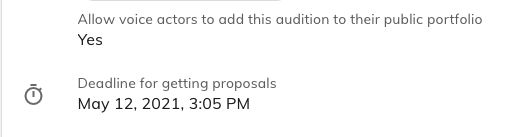
If you were invited to a project that has this setting enabled, you can add your custom audition to a playlist on your profile as a voice over sample, regardless of whether you are hired for the project or not. This enables you to add and update your voice-over samples. And remember to use suitable keywords to tag them.
To learn more about optimizing your voice samples and profile, check out our helpful voice acting guides on The Booth.
How do I know if a project has been awarded to me?
The client will contact you directly via your email address (if you provided one in the notes section) informing you that you have been selected/hired for the job. A client may also choose to send you a direct message to let you know you have been selected for a project using our direct messaging system.
Unsure how to formulate the best reply when communicating with clients? Check out our client communications checklist – we’ve collaborated with voice actors to build a library of messaging templates you can use for your own scenarios!
Ready to upgrade your membership?
Share this post!
A blog owner yourself? Relevant links to quality sites will help your performance on search engines. If your readers will benefit from the services or information on The Booth's Voice over Guide, please consider linking to this post or the guide itself.

FAQs: Project Invitations
FAQs: Project Invitations
Improvements to your ranking score!
We are improving the inclusivity of your ranking score so it factors in all your efforts on Voice123. This means that your proposals now count towards your ranking score if they are booked through our Bookings functionality or if they are liked by clients. Here’s a quick breakdown of what this means.
- You now have more than one way to improve your ranking score.
- Even if your proposal is not liked, if it turns into a booking on Voice123, you will still see a positive impact on your ranking score.
- With Secure Payments, you can ensure that the client has paid on the platform before delivering the recording. Voice123 will hold the funds until the project is completed – this is a great way to protect your voice and build trust with a new client. And it’s completely free for voice actors!
If a client contacts you for a voice over, you can make it easier for them by sharing your free booking link. This allows the client to select from the proposals you have previously sent them while improving your ranking score.
Why am I invited late to projects?
If you’re a match for a specific project, invitations will be sent out in two groups based on these factors:
- Membership type: Elite members receive preferred access to project invitations. After that, Pro members will be invited depending on how high the membership is. At this point, if a project has yet to receive enough proposals, Free members might receive an invitation.
- Ranking score: this is a percentage of 1) liked proposals out of the total number of proposals submitted and 2) bookings that clients created from your proposals.
The best way to gain access to projects earlier is to:
- Upgrade your membership;
- Improve your ranking score by submitting proposals that match your voice to increase the chances of the proposal being liked and by asking clients to create a free booking with you when you work together. You can make it seamless for clients to book you by sharing your free booking link with them.
Why was I not invited to a project that matches my profile?
Once a project is posted, Voice123 sends out invitations to voice actors based on two factors. The first one is if your profile preferences and the project requirements are a match. The second is your membership level and ranking score (a percentage of your Bookings and proposals liked by clients).
That means that Voice123 looks through all the voice actors that meet the project requirements and then categorizes them by membership and ranking score, and then sends invitations in that order. So depending on the number of invitations requested by the clients and how soon the project gets fulfilled, you may or may not be invited.
Why am I not receiving invitations to projects?
If you are not receiving invitations to a project as a Pro member, there are four main reasons.
- Your profile doesn’t match the projects submitted.
- Your Invitation settings don’t match the projects submitted.
- Your profile information is incomplete, and you don’t have enough audio samples that reflect your skills and services offered.
- Your ranking score needs to improve.
- Your membership has just expired, so you no longer receive preferred access to projects.
If you’re a new Pro member and you haven’t received an invitation for more than three days, please contact us at help@voice123.com.
How do audience size and usage affect booking requests?
Audience size and usage affects booking requests by determining the rates voice actors will set for a specific project. At Voice123, we’ve created a card that automatically calculates what your rate should be based on two factors.
- Your base rate per word/time, and
- The expected audience size.
With that information, we can create a solid rate card that you can use whenever you get invited to a project. So you’re able to get more booking requests without the hassle of calculating new rates each time.
Why am I being invited to too many low-budget projects?
Voice123 is an open marketplace. Therefore we don’t control the rates set by the voice actors or the budgets posted by the clients. If you’re being invited to too many low-budget projects, you can set a minimum budget for the project invitations you’d like to receive.
- Start by logging in to your Voice123 account.
- Click the three small lines on the upper left part of the page to open a menu.
- Choose Invitations Settings.
- Click Get invites that pay and set your budget preferences.
When submitting your proposal, you can also quote a budget amount you think is more appropriate for a project.
Ready to upgrade your membership?
Share this post!
A blog owner yourself? Relevant links to quality sites will help your performance on search engines. If your readers will benefit from the services or information on The Booth's Voice over Guide, please consider linking to this post or the guide itself.

Is there a way to receive opportunities earlier in the day?
Is there a way to receive opportunities earlier in the day?
Project invitations are sent to your inbox as they are approved, processed by the system, and matched to your profile. The system handles projects 24 hours a day, irrespective of time zones.
However, upgrading to a higher membership level can increase the number of project invitations you receive and your chances of being invited sooner.
Ready to upgrade your membership?
Share this post!
A blog owner yourself? Relevant links to quality sites will help your performance on search engines. If your readers will benefit from the services or information on The Booth's Voice over Guide, please consider linking to this post or the guide itself.


As a Free member, how can I submit a proposal for a project?
As a Free member, how can I submit a proposal for a project?
As a Free member, your profile will be displayed in our voice actor database, where clients can find you using the search feature on our site. The matching system notifications you receive let you know what types of jobs are available on our site.
You can submit proposals in two ways:
- by receiving a direct invitation from a client
- by receiving an invite from the system if you are a match, and if the project proposal requirement has not been met by invitations to Elite, Pro and Starter members.
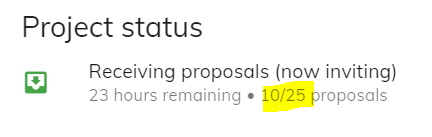
This means that when you are invited to submit your audition, you must send it in before all the required amount of proposals are received. You can refresh the page to check this figure.
Our Free subscription is designed to help you become acquainted with our website and the online voice over industry. Once you are comfortable with the platform, you can take the next step in your career by upgrading your membership.
If you’re looking for more resources on navigating the voice over industry, why not check out our Voice over Guide on The Booth?
Ready to upgrade your membership?
Share this post!
A blog owner yourself? Relevant links to quality sites will help your performance on search engines. If your readers will benefit from the services or information on The Booth's Voice over Guide, please consider linking to this post or the guide itself.
How does the bookings system work for voice actors?
How does the bookings system work for voice actors?
Voice123’s booking feature is a VO game-changer, and with your own personalized booking link, it’s the perfect way to boost your voice acting jobs. It also has a secure payment system to help you avoid the hassle of invoicing and the challenges of receiving international payments. Most importantly, it’s free:
Zero commission or fees are deducted, regardless of your membership – what you earn is yours to keep!
How does the booking feature work?
Clients on Voice123 can book you via these channels:
- Via your project audition.
- From a conversation in Voice123’s message inbox.
- Directly from your voice actor profile.
- From your booking link.
- Via the instant quote feature on Voice123’s search functionality. This booking quote is determined by the sum of your voice over rates per script length (word count) and usage (expected audience size).
All bookings also have the same set of initial terms:
- A maximum of 12 months’ usage.
- Up to 2 revisions.
- An expected turnaround of 3 days.
What does that mean for you?
Voice123’s booking feature is built on a foundation that goes beyond getting hired or booked for one or two voice acting jobs. So, bookings help you build long-standing relationships with clients. It’s the ideal basis for recurring work. As a result, you’re expected to review and accept or decline a booking request within 3 days.
You can also get booked through the following channels:
- Share your booking link with a client. This is a special link that is customizable and which directs a client straight to a booking form where they can input their project details.
- Bring your off-platform bookings to increase your bookings stats and see your earnings on your dashboard.
- Enable bookings for our instant quote feature. Set your rates now! – only for paid members.
- Audition for projects so clients can book you directly from your auditions.
- Talking to a client in the message inbox? Ask the client to click ‘book voice actor’ from the message tab at the top of the page.
- Tag your samples with relevant keywords so clients can find your profile in the search feature and book you through your profile card.
Get started today by sharing your free booking link!
Ready to upgrade your membership?
Share this post!
A blog owner yourself? Relevant links to quality sites will help your performance on search engines. If your readers will benefit from the services or information on The Booth's Voice over Guide, please consider linking to this post or the guide itself.
What are W8 or W9 forms, and where may I find them?
What are W8 or W9 forms, and where may I find them?
What is a W9 Form?
A W9 form allows you to provide your US tax ID, aka TIN: Taxpayer Identification Number, to the person, including a financial institution, who needs to report certain information about you, such as income, contributions to IRAs, interest, dividends, and capital gains, certain real estate transactions, the balance of certain foreign financial accounts, etc. to the IRS.
The tax ID of US individuals is either the SSN – Social Security Number (in most cases) or the ITIN (Individual Taxpayer Identification Number) in some situations. The tax ID of US entities is the FEIN – Federal Employer Identification Number, sometimes also referred to simply as EIN. 1.
Who must complete a W9 Form?
A W9 form must be completed by US persons: US citizen or green card holder individuals, individuals who are treated as residents for US tax purposes either because they live in the US, work there, or are married to a US individual and elected to be taxed as one; and entities such as corporations, LLCs, estates, and trusts created or organized under US law.
Why am I being asked to send a W9?
Any US business making payments to you may request that you complete this form. These payments could be for services you provide to the business as an independent contractor.
Ready to upgrade your membership?
Share this post!
A blog owner yourself? Relevant links to quality sites will help your performance on search engines. If your readers will benefit from the services or information on The Booth's Voice over Guide, please consider linking to this post or the guide itself.
How does Voice123's Secure Payment work for voice actors?
How does Voice123's Secure Payment work for voice actors?
The Secure Payment system is where Voice123 acts as a bond for a booking transaction between a voice actor and a client. The service is free to all voice actors, and while it’s not a requirement, it does have numerous benefits, such as:
- Zero deductions from your earnings.
- Save time, energy, and resources as Voice123 will manage the transaction until the final recording is accepted.
- Rest easy with a secure and trusted third-party method to manage your payments.
- Resolve the problem of sending and receiving international payments without having to follow up on invoices.
- Track the status of the payment directly in the booking and deliver the recording when you see the funds were paid.
- Get email notifications along the way to help you keep track of each stage of the booking process.
- Choose from 5 different payment methods to receive your funds.
How does the Secure Payment system work?
- A voice actor or a client can request Secure Payment for a booking. Voice123 will manage the transaction until the final recording is accepted.
- The client transfers the payment to Voice123.
- Voice123 holds the money until the final recording is accepted and then releases the payment to the voice actor.
When will you receive the payment?
- The funds are released after the client accepts the final recording.
- Voice123 releases payment as soon as possible after the client indicates that the recording has been accepted. We guarantee that this will happen within 8 business days – but it’s usually much, much sooner!
Is the Secure Payment system really free for voice actors?
- Yes! Voice actors will not be charged for using Secure Payment. The client is charged a fee, but this is not deducted from the amount the voice actor agreed to.
- The costs associated with receiving the money will be for your account, depending on the payment method you chose, so please check with the third-party provider (such as your bank, PayPal, etc.).
How do you enable Secure Payments for your voice acting jobs?
- By requesting a Secure Payment when you receive a booking.
- By enabling the functionality in settings on the bookings page.
Ready to upgrade your membership?
Share this post!
A blog owner yourself? Relevant links to quality sites will help your performance on search engines. If your readers will benefit from the services or information on The Booth's Voice over Guide, please consider linking to this post or the guide itself.
How to make your voice deeper
By learning how to make your voice deeper, you can add authority and allure to songs, character voices, and even public speaking. Consider Tom Hardy’s throaty, menacing whispers as Bane or motivation speaker Tony Robbins’ baritone, gravelly voice. Deeper voices convey authority, confidence, and charisma—qualities that leave lasting impressions in social and professional settings. Here are some of the best tips and techniques to learn how to make your voice deeper naturally and effectively.
Why are deeper voices preferred
Deeper voices are associated with the assertiveness and authority of someone in an influential or leadership position, and they’re considered attractive because they convey a sense of maturity and stability. However, these preferences are mostly shaped by culture and personal taste. In media and entertainment, deeper voices can be impactful in narration and character types, like villains or mentors, and add warm, rich tones to commercials, animated film leads, or even video game characters. Ultimately, learning how to improve your voice range by making your voice deeper can convey intense emotions, whether it’s sorrow, determination, or ambition.
How to make your voice deeper naturally
Biological aspects like genetics, hormones, and puberty can lengthen and thicken vocal cords, resulting in deeper voices naturally. But not everyone’s voice changes in the same way. Sometimes, behavioral and environmental factors like regular speech patterns, vocal habits, and vocal training can influence the depth of a voice. Even age, physical health, and lifestyle choices like smoking impact how to deepen your voice. Essentially, how sound is produced and resonates in the vocal tract, including the throat, mouth, and nasal cavities, varies from person to person. So, while external factors contribute to a deeper voice, every individual’s voice is unique. With that in mind, here are some tips on how to get a deep voice.
How to make your voice deeper
To make your voice deeper without hurting your vocal cords:
1. Activate your lower lungs
Deep diaphragm breathing from your lower lungs instead of shallow chest breathing strengthens your lung capacity and breath control so you can tap into fuller, more robust vocal tones. Inhale slowly through your nose to expand your abdomen, hold it for a few seconds, and exhale slowly through your mouth.
2. Hold your head high
Slouching and hunching over restricts the airflow in chest muscles, but when your head is aligned with your spine, your lungs have more space to expand, giving you more breath control during speaking or singing. Always keep your feet shoulder-width apart with your neck relaxed to release tension.
3. Exercise your vocal cords
- Humming: Engages the vocal cords by resonating in your chest so you can reach lower notes, making your voice deeper.
- Vocal fry: Helps produce a creaky vocal sound at the lowest pitch possible so you can access and strengthen your lower vocal range.
- Sirening: Involves sliding your voice smoothly up and down a pitch range to enhance vocal flexibility and improve pitch control.
- Lip trills: Sounds like “brrr” or “trrr” are made by blowing air through pursed lips to warm up the voice, relax tension, and promote airflow control.
- Yawn-sigh: Opening the mouth wide and releasing a slow, extended sigh with an “ah” sound helps ease tension in the throat muscles for a relaxed vocal tone.
- Tongue exercises: Practicing tongue twisters with repeated phrases and complex sounds improves articulation, diction, and tongue coordination for clearer speech.
4. Mimic voice styles
To learn how to deep your voice, imitate the deeper voices of characters from movies, TV shows, or audiobooks by matching their tone and pitch. You can explore different vocal ranges, like Vin Diesel’s lines as Groot in “Guardians of the Galaxy.” In a single line, ‘I am Groot,’ his tone ranges from baritone and gravelly to low velvety gravitas.
5. Project your voice
Experiment with loud and soft tones and volume, but maintain a relaxed throat to avoid strain and achieve a deeper resonance. Practice making your voice deeper by speaking in Scarlett Johansson’s soothing, husky voice or following Gilbert Gottfried’s loud, shrilly, high-pitched tone.
6. Slow it down
Slowing down your speech rate can naturally lower the pitch of your voice. Adding strategic pauses also adds weight and depth to spoken words.
7. Whisper away
Whispering is a technique you can use to explore lower registers by speaking in a controlled, low-pitched manner. This helps you maintain depth and resonance at softer volumes.
8. Be vocally creative
Develop unique personalities and voices for your own characters by exploring tones, accents, and pitches. This is an imaginative activity that helps you explore different vocal ranges creatively.
9. Centralize your vibrations
Relaxing and vocalizing deeply and rhythmically helps you concentrate on your vocal vibrations to produce low, resonant tones. It also relaxes and grounds you
10. Morph your voice
Imitate non-speech sounds with your voice, like drumbeats, whistles, a clock ticking, wind blowing, or waves crashing, to experiment with tones and depth. You can draw vocal inspiration from pros like Alan Tudyk, who created the vocal sounds for HeiHei, the rooster in Moana, and Tuk Tuk, the armadillo from Raya and the Last Dragon.
Do you need a deeper voice?
While it’s not a requirement to have a deeper voice in the voice over industry, knowing how to deep your voice is an important skill in voice acting. Especially since deeper voices can convey strength and maturity, which are sought-after vocal qualities in animation, video games, commercials, or audiobooks. And a deeper voice can also improve the sound quality of your vocal performances.

So, if you have a deeper vocal range, you’re a top candidate for roles such as wise mentors, powerful villains, assertive narrators, or characters with gravitas and vigor. Consider Christopher Lee as Saruman in “The Lord of the Rings” series. His deeper voice enhanced the character’s sheer power and darkness, making the performance more impactful. Or James Avery as Uncle Phil in “The Fresh Prince of Bel-Air.” Avery’s deep voice added a sense of wisdom and warmth to the character, portraying him as a loving yet firm patriarch. A deeper voice can also modulated, shifting from intimidating to soothing tones; that’s why it’s important to know how to get a deep voice.
How to make your voice deeper: Examples from the pros
- James Earl Jones has a robust voice that oozes authority and power and is characterized by its rich timbre and commanding presence. He created the ominous, authoritative tones of Darth Vader in “Star Wars” and the regal, fatherly warmth of Mufasa in “The Lion King.”
- Morgan Freeman has a soothing, mellifluous voice that’s described as velvety and comforting. He narrates documentaries and films like “The Shawshank Redemption,” where his voice adds insight and feeling, and “Life On Our Planet,” where he infuses the story with empathy and gravitas.
- Keith David has a full-bodied, silky voice that carries sophistication and power in roles like Goliath in “Gargoyles,” where his voice is noble and definitive. Or as the Arbiter in “Halo,” where he conveys strength, honor, and complexity.
- Kevin Michael Richardson has a resonant, adaptable voice that carries depth, strength, and flexibility in roles like Shredder in “Teenage Mutant Ninja Turtles,” where he adds menace and intensity. In “The Cleveland Show,” as Cleveland Brown Jr., however, his tone is youthful and sometimes comical.
So, following these tips will help you learn how to deepen your voice for a project or audition and become better at voice acting. But your foremost concern should always be to protect your vocal health and avoid damaging your vocal cords. Embrace your voice’s uniqueness by enhancing its qualities and discovering the depths and nuances it can bring to your voice acting career – you may just find the perfect niche for your own voice – deep or not.
FAQ's for how to make your voice deeper
Practice speaking from your diaphragm by doing vocal exercises, maintaining good posture, staying hydrated, and avoiding vocal strain. You can also try speaking at a slightly lower pitch than your natural voice so your voice resonates in your chest.
Smoking and excessive alcohol consumption can potentially irritate your vocal cords, resulting in a hoarse voice that doesn’t necessarily have appealing depth. Consistent use also harms your voice quality instead of deepening it.
Generally, a person’s voice alters with age because of puberty and hormonal changes, but this isn’t a universal rule because genetics and lifestyle also impact vocal pitch changes over time.